Dock Scheduler Helps Warehouse Workers Stay Safe
Managing loading dock traffic with old-fashioned spread sheets, whiteboards and paper schedules can lead to overlapping arrivals. Instead, use a tool that enables you to book dock appointments in real time, reduce congestion at the dock doors, and help keep everyone safe, on schedule and efficient.
The loading dock is both important and vulnerable, since dock workers must interact with truck drivers and their cargo during both inbound and outbound warehouse activities. Instead of having drivers show up to your facility and wait around, by planning and managing appointments, staff, and loading bays you can eliminate problems related to resource availability and overbooking.
The days of attempting to maintain appointments and schedules via an office white board are over! Add a large TV monitor to display a full graphical dashboard of all the scheduled carrier and customer appointments for easy viewing by your entire team.
Connected with your warehouse management software (WMS), a dock door management app can easily reschedule appointments, change dock door assignments, and have notifications sent automatically with any updates.
Dock door schedulers are also powerful data tools that let you easily search, filter and generate reports, including full audit trails of schedule compliance. By integrating it with, for example, Cadence WMS Receiving and Shipping, the dock scheduler becomes a seamless part of your warehouse operation.
Convenience and Real-Time Visibility for Dock Door Management
Warehouse Managers and CSRs use the Cadence Dock Scheduler module to manage inbound and outbound shipments. The software allows users to identify when doors will be blocked for maintenance or other activities too, so they won’t be scheduled for use.
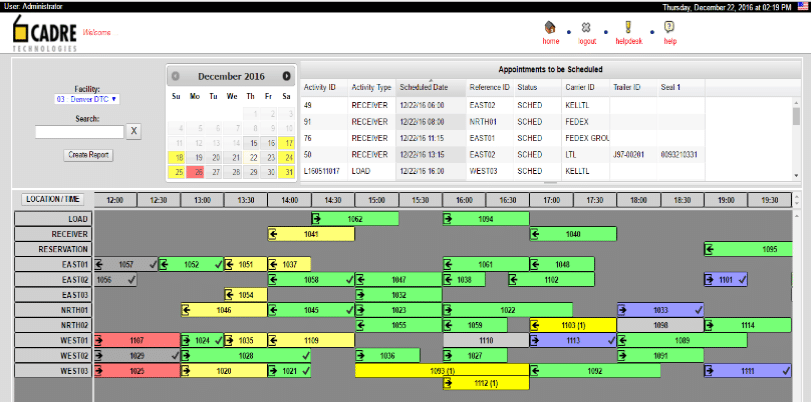
Connect your company warehouse calendar and the module will ensure that all appointments and activities are scheduled at valid times. This feature automatically takes into consideration your operating hours, holiday schedule, lunch and break schedules, etc. Conflicts are quickly identified via an intuitive graphical user interface.
Integrating the Dock Scheduler module with the Cadence Customer portal (Web Access) allows you to further tailor all aspects of the system, including security and messages. And, since it’s fully integrated, there’s no need to re-enter data into the Cadence WMS system. Any changes are reflected real-time in the Cadence WMS, so mobile workers always have the latest information on their scheduled inbound or outbound activities.
Quick lookups into the status of any appointment, inbound receiving, and outbound shipping activities are available on-line, reducing the need to run reports for this information. Reporting is, of course, also included and can be helpful to audit carrier compliance with scheduled appointment times, changes to schedules, etc.
Ready for a clear and organized dock schedule? Assigning dock doors in advance and providing real-time updates will keep things organized while reducing the need for person-to-person interactions. Having up-to-date information accessible from any location or device enables your shipping and receiving operation to meet the latest recommended procedures for driver check-ins and dock worker safety. During this uncertain time, there is nothing more important than all of us working together to minimize physical contact and to limit the transmission of the novel COVID-19 virus.
If you would like more information on the Dock Scheduler module, or other Cadence WMS features from Cadre Technologies to help you operate safely and more efficiently, please contact us. We’re here to help.
Frequently Asked Questions
What is dock door scheduling software?
Dock door scheduling software is a digital tool that automates the booking and management of loading dock appointments. It replaces manual methods like whiteboards and spreadsheets with real-time scheduling capabilities. The software coordinates truck arrivals, assigns dock doors, and integrates with warehouse management systems to prevent overlapping appointments and reduce congestion.
How does dock scheduling reduce safety risks for warehouse workers?
Dock scheduling reduces safety risks by minimizing unplanned truck arrivals and eliminating crowded dock areas. It limits person-to-person contact between dock workers and drivers through advance planning and real-time updates. The system also ensures proper spacing between appointments, reducing the need for workers to navigate around multiple trucks simultaneously.
Can dock scheduling software integrate with existing warehouse management systems?
Yes, dock scheduling software typically integrates directly with warehouse management systems (WMS). This integration eliminates duplicate data entry and ensures real-time synchronization of appointment changes. When integrated, schedule updates automatically reflect in mobile devices used by warehouse workers, maintaining accurate information across all systems.
What happens when a dock door needs maintenance during scheduled operations?
Modern dock scheduling software allows managers to block specific doors for maintenance or other activities, preventing them from being scheduled during those times. The system automatically identifies these conflicts through an intuitive interface and can reschedule affected appointments to available doors. This prevents disruptions and maintains operational flow.
How does automated dock scheduling improve carrier compliance?
Automated dock scheduling improves carrier compliance by providing clear appointment times, automatic notifications for changes, and detailed audit trails. The system generates reports showing carrier adherence to scheduled times and tracks any modifications made. Real-time visibility helps carriers stay informed of their appointments, reducing late arrivals and scheduling conflicts.